
Bakery step 1: bakehouse, shops and modules
In this step you build the shape of the business: where you bake and where you sell. Then you switch on the two modules a bakery relies on, Manufacturing and Order options & personalisation.
Before you start
Section titled “Before you start”- Business name, currency, time zone and tax rates are set (Business settings).
- You know your shops’ addresses and which one bakes.
Create the bakehouse and shop locations
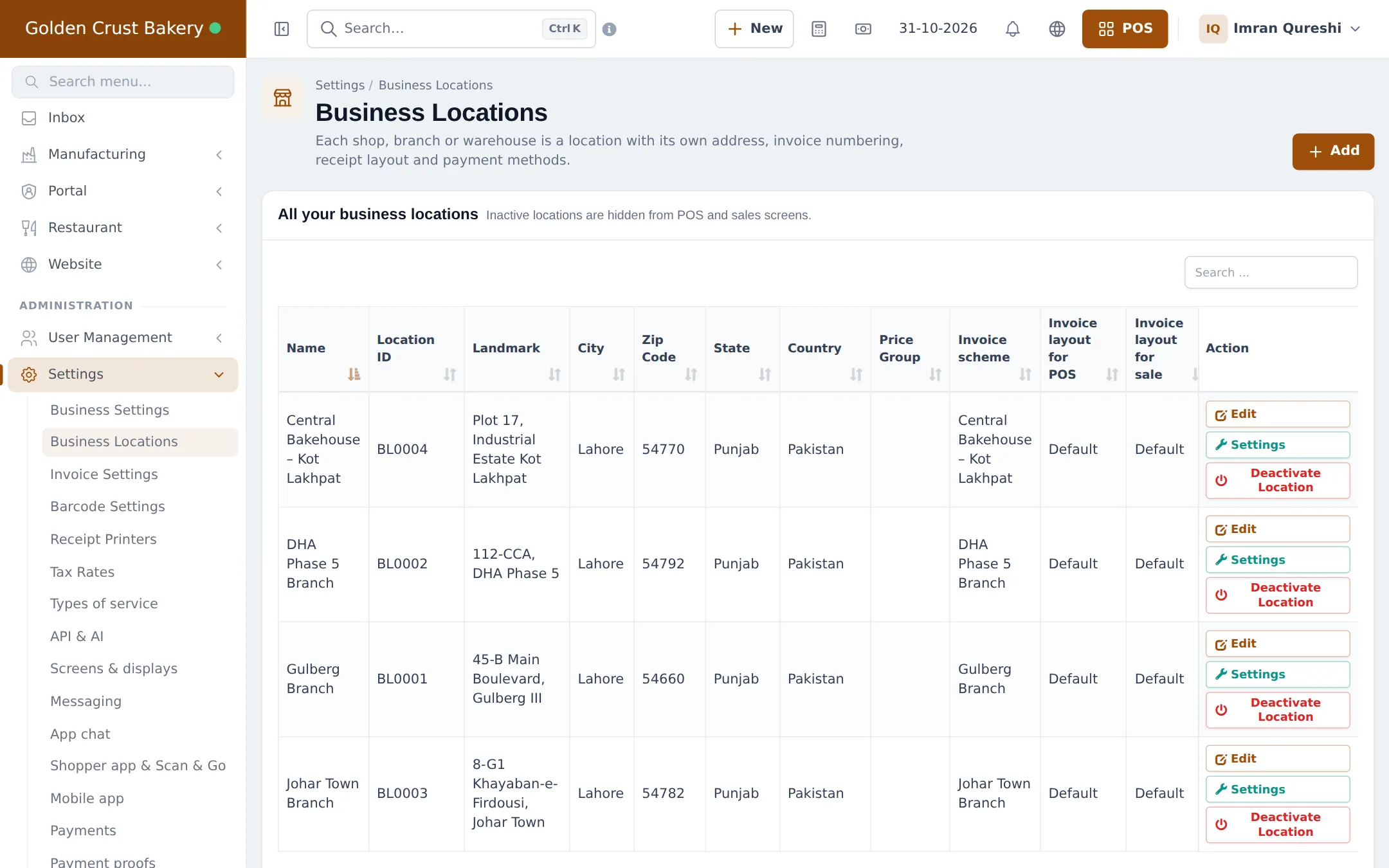
Section titled “Create the bakehouse and shop locations”- Open Settings › Business Locations and click Add.
- Create the bakehouse first, for example “Central Bakehouse”, with its address and its own invoice scheme.
- Add each shop the same way (“Gulberg Branch”, “DHA Branch”).
- Open Settings on each shop location to set its receipt layout, payment methods and POS featured products (the items cashiers tap most).
Switch on the modules
Section titled “Switch on the modules”- Open Settings › Business Settings and click the Modules tab.
- Turn on Manufacturing and Order options & personalisation. Add Accounting & Bookkeeping if you keep your books here.
- Click Update Settings. The Manufacturing menu appears, and Order options appears under Products.
Turn on product expiry
Section titled “Turn on product expiry”Bread and cakes have a short life. In Settings › Business Settings › Product, tick Enable Product Expiry and click Update Settings. Then each product gets an Expiry Period (for example 2 days), and completed batches get their expiry date automatically. See Expiry and batches.
Give the team their logins
Section titled “Give the team their logins”In User Management › Roles, import or create Production Manager and Production Worker roles (see Prebuilt), plus a Cashier role for the shops limited to their own location. Add each person as a user (Users and roles).
Tips and mistakes to avoid
Section titled “Tips and mistakes to avoid”- Don’t buy raw materials into the shops. Buy them into the bakehouse, where production uses them.
- Limit shop cashiers to their own location so they don’t sell from the bakehouse stock by mistake.
Next step
Section titled “Next step”Frequently asked questions
Should the bakehouse be a location even if it doesn't sell?
Yes. Raw materials are bought into the bakehouse, production orders run there and finished goods are transferred out from there. If it never sells, simply don't assign cashiers to it.
I bake inside my only shop. Do I still need two locations?
No. One location can buy, bake and sell. Skip the stock transfer step.
Why switch on product expiry?
So every completed batch gets an expiry date from the product's expiry period, and the stock expiry report can tell you what must be sold or written off today.
Which roles do bakers need?
The prebuilt Production Manager and Production Worker roles are a good start. Workers see and complete only their own production orders; managers plan, approve and see costs.
Can each shop have its own receipt and invoice numbers?
Yes. Each location has its own invoice scheme and receipt layouts, so shop receipts can carry the branch address.