
Edit e-mail, SMS and WhatsApp notification templates
This guide shows how to edit the e-mails, SMS and WhatsApp messages SmartPOS Hub sends to your customers and suppliers, and how to turn on automatic sending. It is for owners and managers. Editing one template takes about five minutes.
Before you start
Section titled “Before you start”- Open it from Notification Templates in the left menu (Administration group).
- Permission: send notification (owners and Admin have it).
- How e-mails and SMS leave the system is set in Business Settings › Email Settings and SMS Settings. See Business settings reference.
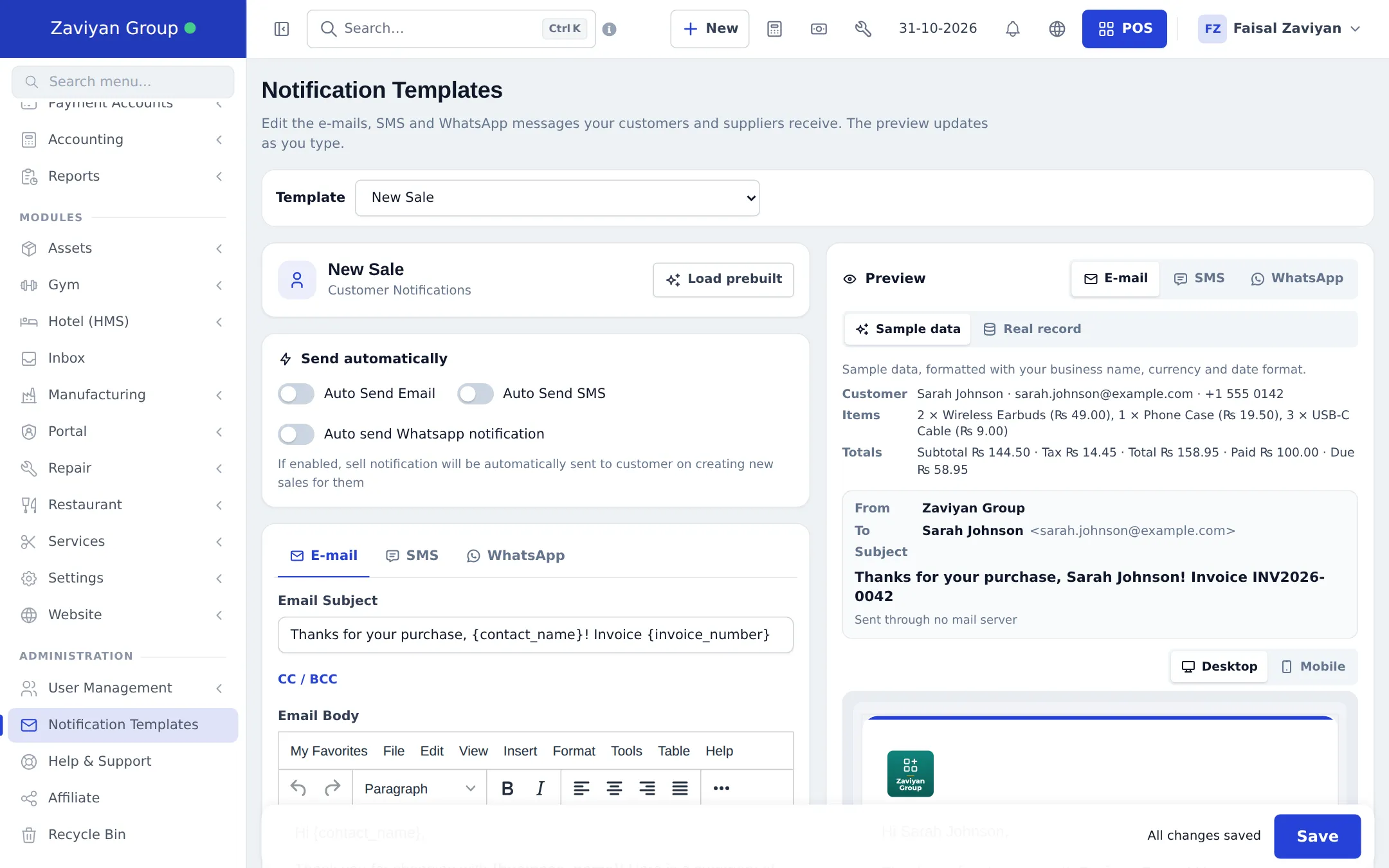
Edit a template
Section titled “Edit a template”- Choose the message in the Template list, for example New Sale.
- Optional: click Load prebuilt, pick a Friendly, Formal or Short text and click Use this text.
- On the E-mail tab, edit the Email Subject and Email Body. Open CC / BCC to copy someone in.
- On the SMS tab, edit the SMS text. The counter shows characters and message parts.
- On the WhatsApp tab, edit the WhatsApp text (
*bold*,_italic_work). - Click tag chips to insert details such as the customer name, invoice number, total, due amount or invoice link.
- Check the Preview: switch E-mail / SMS / WhatsApp, Desktop / Mobile, and Sample data / Real record.
- Click Save. The bar shows unsaved changes until you do.
Turn on automatic sending
Section titled “Turn on automatic sending”Templates that the system can send by itself show Send automatically:
| Template | Auto options |
|---|---|
| New Sale | Auto Send Email, Auto Send SMS, Auto send Whatsapp notification |
| Payment Reminder (listed as “Payment Remider”) | E-mail, SMS, WhatsApp |
| New Booking | E-mail (plus the booking setting to notify customers) |
| Hotel booking, gym membership expiry | E-mail (and SMS for hotel), when those modules are on |
Other templates (for example quotations, purchase orders, ledgers) are sent by hand with the notification buttons on the sale, purchase or contact.
Send a test
Section titled “Send a test”Use Send test e-mail or Send test SMS to send the current (even unsaved) text to your own e-mail or phone. Tests are limited to a few per minute and per day. A test SMS uses your SMS allowance.
Tips and mistakes to avoid
Section titled “Tips and mistakes to avoid”- Keep SMS short: one part (160 plain characters) costs least.
- Always include your business name; customers may not recognise the sender.
- Do not delete tags you need, such as the invoice link in New Sale.
- Write in your customers’ language. Templates are plain text; you can write them in any language.
Related pages
Section titled “Related pages”Frequently asked questions
Which messages can I edit?
Customer messages such as New Sale, Payment Received, Payment Reminder, New Booking and New Quotation, module messages (booking payments, gym, hotel, repair, recovery carts, website orders and returns), supplier messages such as New Order, Payment Paid, Items Received and Purchase Order, and Send Ledger. Pick one in the Template list.
Which messages are sent automatically?
Only templates with a Send automatically section, such as New Sale and Payment Reminder. Switch on Auto Send Email, Auto Send SMS or Auto send Whatsapp notification there. Others are sent by hand from the sale, purchase or contact.
What are the words in curly brackets?
Tags. {contact_name} becomes the customer's name, {invoice_number} the invoice number, and so on. Click a tag chip to insert it where your cursor is.
Can I see the message before it is sent?
Yes. The Preview on the right updates as you type, with sample data or a real sale, purchase or contact from your business, for e-mail, SMS and WhatsApp.
Are there ready-made texts?
Yes. Click Load prebuilt to choose a Friendly, Formal or Short version. It fills the editor; nothing is saved until you click Save.
How many characters can an SMS have?
The SMS tab counts characters and message parts. One part holds 160 plain characters or 70 characters in other scripts such as Urdu or Arabic; longer texts are sent as several parts.
Does sending a test cost SMS credits?
A test SMS counts against your monthly SMS allowance like any other SMS. Test e-mails are free.
How is WhatsApp sent?
WhatsApp messages open WhatsApp with the text filled in, ready to send from your phone. The Connect module can also send through your shop phone.