
Jewelry store step 3: prices, gold rate and making charges
A gold piece is usually priced as metal weight × today’s rate for its karat + a making charge. SmartPOS Hub stores a selling price per piece (or per gram); it does not pull a live gold rate. This step shows three ways to work with that, and how to reprice quickly when the rate moves.
Before you start
Section titled “Before you start”- Pieces have their Metal weight and karat recorded (step 2).
- You have today’s rate per gram for each karat you sell.
Choose how you price
Section titled “Choose how you price”| Method | How it works | Good for |
|---|---|---|
| A. All-in price per piece | Selling price = weight × rate + making charge, entered on the product | Finished, tagged pieces (rings, sets, bangles) |
| B. Price plus a making charge line | Product price = metal value; add a Making charge service product to the sale | Showing metal and labor apart on the invoice |
| C. Sell by the gram | Unit Gram, price per gram; the quantity is the weight | Chains by length, bullion, coins, old-gold style trade |
A. All-in price per piece
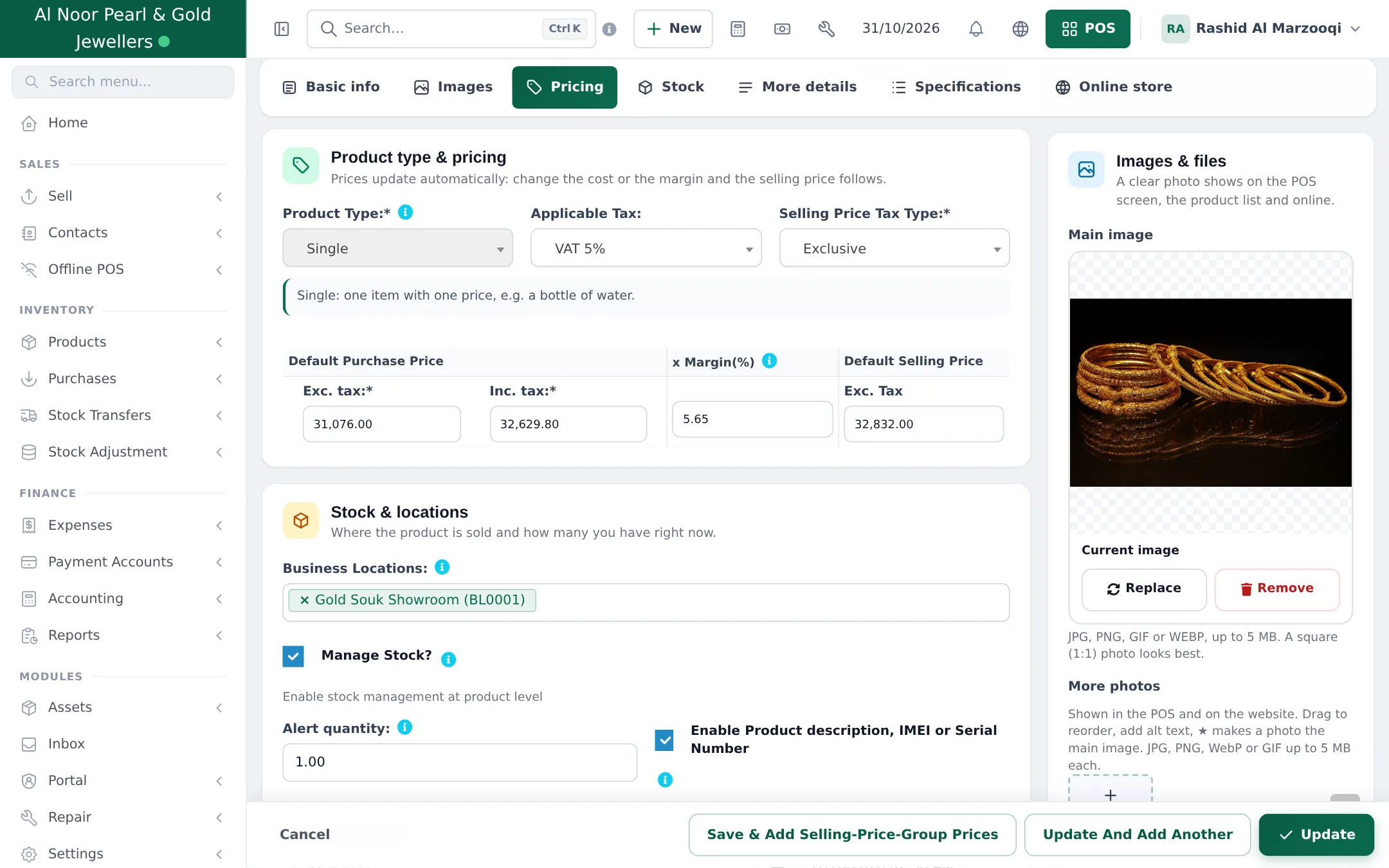
Section titled “A. All-in price per piece”- Edit the product and open Pricing.
- Enter the Default Purchase Price (what the piece cost you) and either a Margin(%) or the Default Selling Price directly.
- Choose Selling Price Tax Type (Inclusive if your tags show tax-inclusive prices).
- Click Update.
B. A separate making charge line
Section titled “B. A separate making charge line”- Add a product Making charge with unit Service (or Pieces), Manage Stock? off, and price 0 or a typical amount. See Service products.
- At the till, add the piece, then Making charge and type the amount for this piece on the line.
- The invoice shows the metal value and the making charge on separate lines, both taxed as you set them.
Cashiers need permission to edit the line price for this method, so give it to trusted staff only.
C. Sell by the gram
Section titled “C. Sell by the gram”- Make sure the Gram unit exists with Allow decimal = Yes (step 1).
- Add the product (for example “22K Rope Chain”) with unit Gram and the selling price per gram (rate + making charge per gram).
- At the till, type the weight as the quantity (12.35). The total is weight × price per gram.
When the gold rate changes
Section titled “When the gold rate changes”- Open Products › Update Price and click Export product prices. The file lists every product with its SKU, current prices and a column per selling price group.
- In Excel, recalculate the selling price of the gold pieces from their weight and the new rate. Don’t change names, SKUs or headers; leave a price-group cell empty to keep it.
- Upload the file and click Import file. Every row is checked first, then all prices change at once.
See Prices and discounts for the export and import columns.
Trade and privilege prices
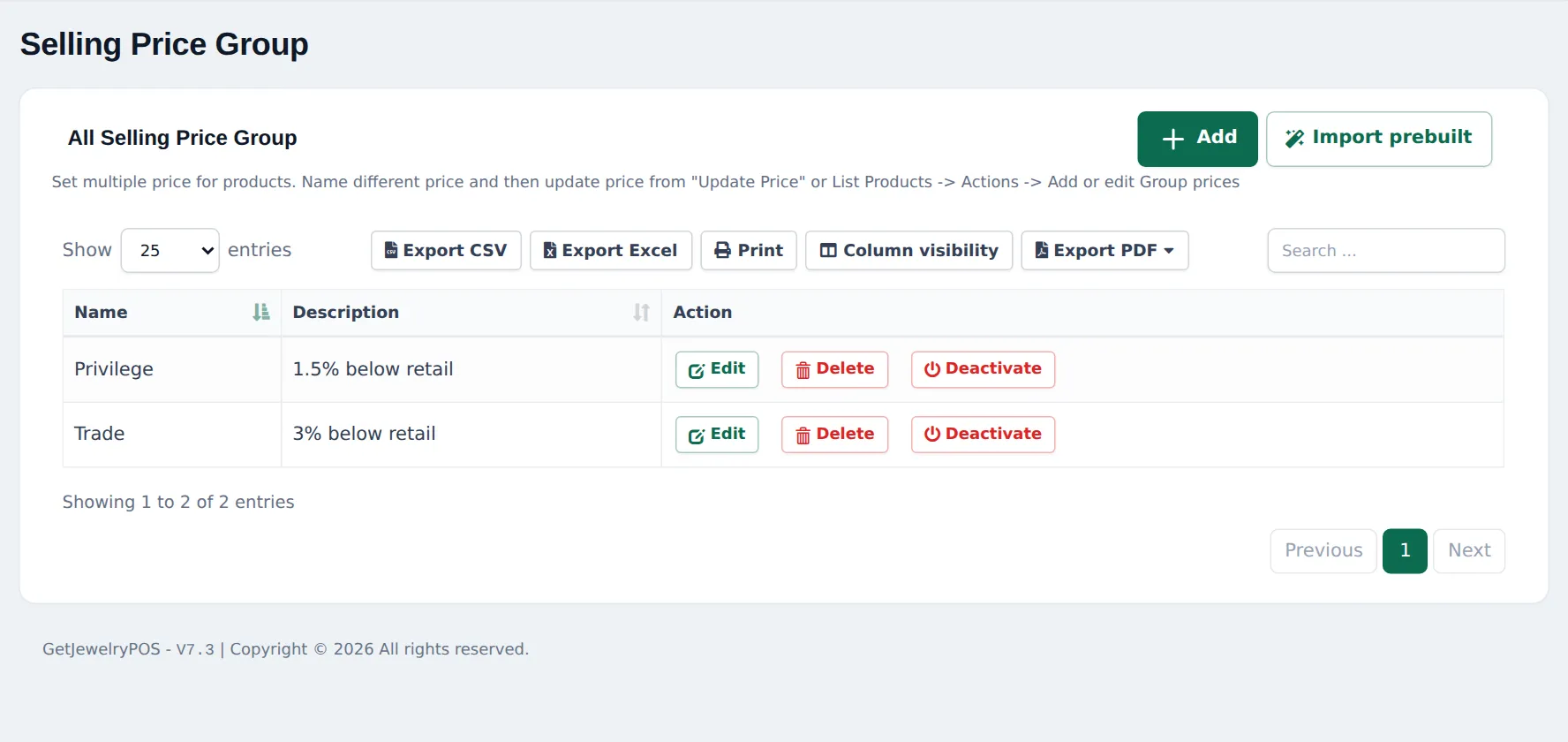
Section titled “Trade and privilege prices”Products › Selling Price Group holds extra price lists, for example Trade for other jewelers and Privilege for loyal customers. Enter the group price per product (Save & Add Selling-Price-Group Prices on the product form) and pick the group on the sale, or link it to a customer group.
Mistakes to avoid
Section titled “Mistakes to avoid”- Old prices after a rate jump. Make the bulk update part of your opening routine on days the rate moves.
- Discounts on gold weight. If you discount, discount the making charge, not the metal; method B makes that easy.
- Missing purchase price. Enter the real cost so Profit / Loss shows a true margin.
Frequently asked questions
Does SmartPOS Hub update prices from the gold rate automatically?
No. There is no live gold-rate feed. When the rate changes, export prices with Products › Update Price, recalculate them in Excel and import them back. It takes a few minutes for the whole stock.
Should the making charge be in the price or a separate line?
Both work. Inside the price is fastest at the till. A separate Making charge line shows the customer the metal value and the labor apart, which many jewelry buyers expect.
Can I sell a chain by weight?
Yes. Give the product the unit Gram (decimals allowed) and set the selling price per gram. At the till, type the weight as the quantity, for example 12.35.
Can trade customers get a lower price?
Yes. Create a selling price group such as Trade, enter group prices per product, and pick the group on the sale or link it to the customer's group.
Can a salesperson change the price at the till?
Only if their role allows editing the product price. Keep it for managers on high-value stock.