
Salon & spa daily routine: open, book, close
A short routine for a salon or spa front desk. Print it for your team or pin it next to the reception computer.
Opening
Section titled “Opening”- The receptionist opens the cash register with the opening cash (it asks the first time they open the POS).
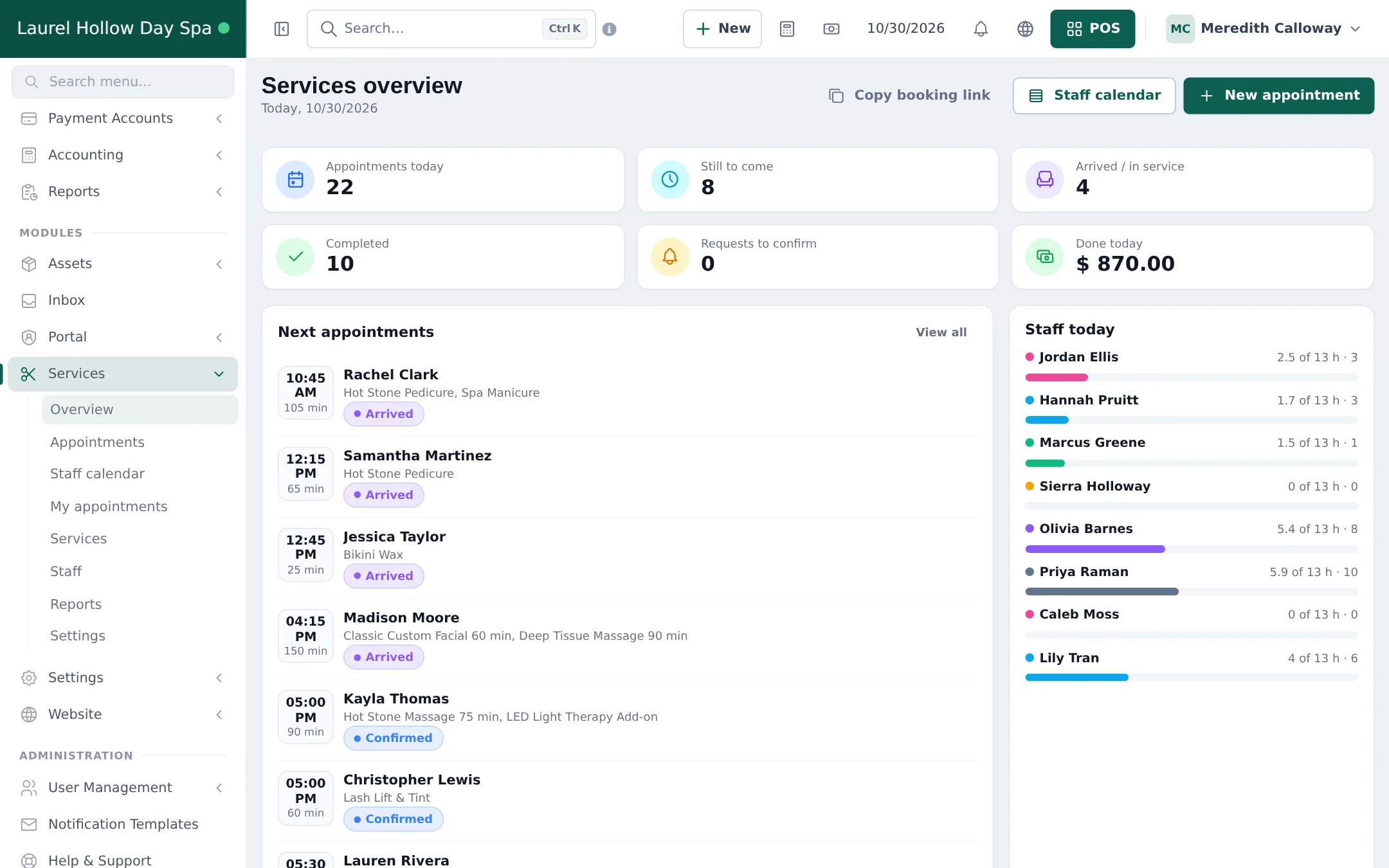
- Open Services › Overview: check Requests to confirm and confirm or decline online bookings.
- Check Settings › Booking payments for deposits waiting for payment and Receipts to review.
- Look at Staff today: who is in, and who has gaps for walk-ins. Move appointments if a stylist called in sick.
During the day
Section titled “During the day”- Arrivals: Check in from Today’s arrivals, then Start when the service begins.
- Walk-ins: New appointment with source Walk-in for the stylist who is free.
- Checkout: always from the appointment’s Checkout button; add retail products; use Advance for paid deposits.
- Phone bookings: New appointment with source Phone; use Request payment if you want a deposit.
- Stylists: follow their clients in My day in the SmartPOS Business app.
Closing
Section titled “Closing”- Mark leftover appointments Completed, No-show or Cancel booking.
- Each cashier closes their register: count cash, compare with the expected total and close. See Cash register and closing.
- Glance at tomorrow on Bookings (Day view) and call clients with unconfirmed or unpaid bookings.
Weekly and monthly
Section titled “Weekly and monthly”| When | Check | Where |
|---|---|---|
| Weekly | Commission per stylist | Services › Reports › Staff performance & commission |
| Weekly | No-shows and where bookings come from | Services › Reports |
| Weekly | Retail stock to reorder | Reports › Stock Report |
| Monthly | Best services and busiest hours | Services › Reports |
| Monthly | Profit | Reports › Profit / Loss Report |
| Monthly | Clients who owe money | Reports › Supplier & Customer Report |
Frequently asked questions
What should the receptionist check first in the morning?
Open the cash register, then the Services overview: Requests to confirm, today's appointments and which stylists are booked. Confirm requests and check deposits waiting in Settings › Booking payments.
How do I see today's takings?
Each cashier sees their register total when closing. Reports › Register Report shows every register, and the Home dashboard shows sales for today by branch.
What do I do with appointments that did not happen?
Before closing, mark them No-show or Cancel booking. Leaving them as Confirmed makes the no-show rate and staff utilisation wrong.
When should I pay commission?
Most salons pay weekly or monthly. Open Services › Reports for the period and use Staff performance & commission as the payout list.