
Reward points (customer loyalty)
Reward points reward customers for buying: they earn points on each sale and spend them as a discount later. You decide how fast points are earned, what they are worth and when they expire.
Set up reward points
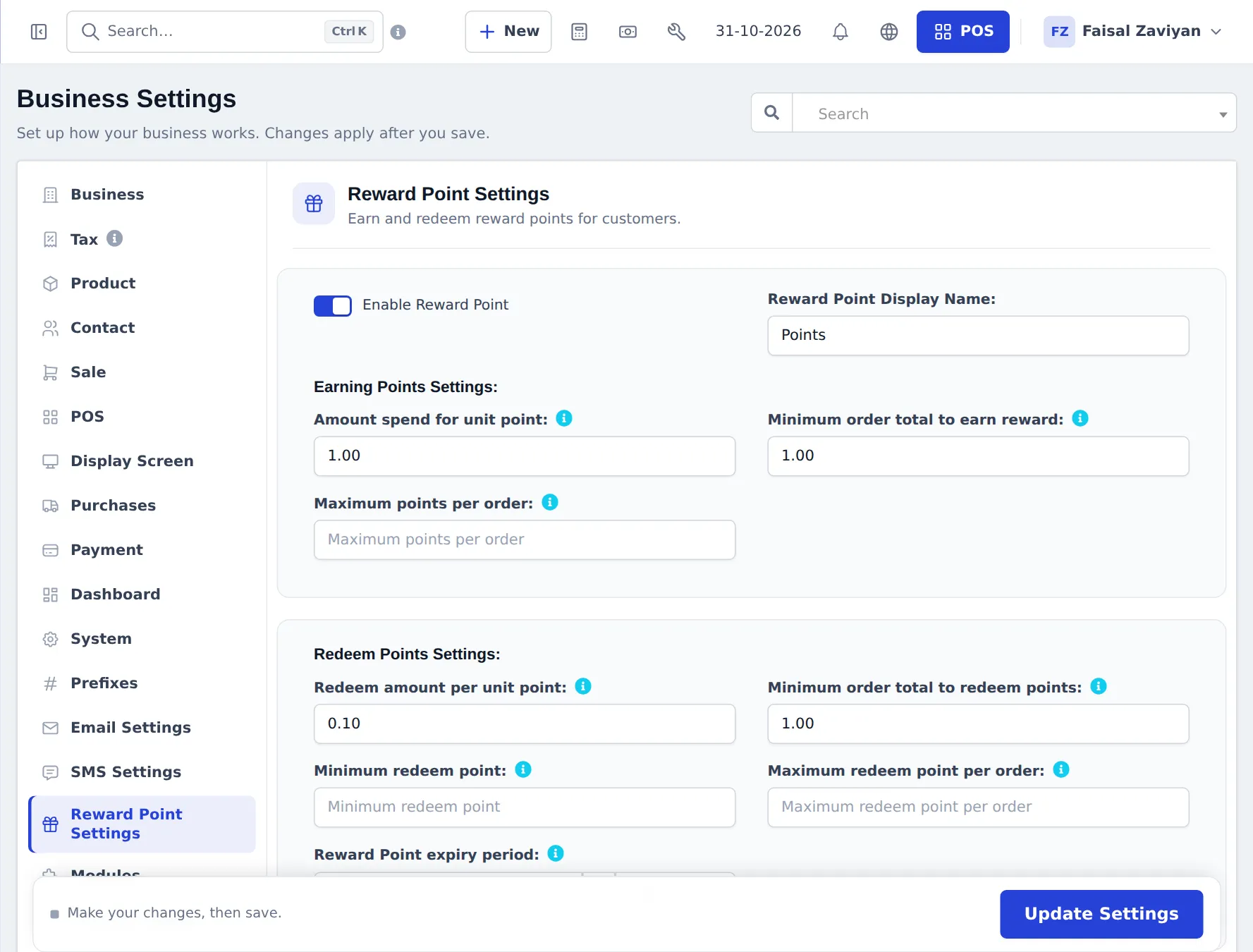
Section titled “Set up reward points”- Go to Settings › Business Settings and open Reward Point Settings.
- Switch on Enable Reward Point and set the Reward Point Display Name (for example Points).
- Earning Points Settings:
- Amount spend for unit point — how much a customer spends to earn 1 point (for example
100). - Minimum order total to earn reward — smaller orders earn nothing.
- Maximum points per order — a cap per sale (blank = no cap).
- Amount spend for unit point — how much a customer spends to earn 1 point (for example
- Redeem Points Settings:
- Redeem amount per unit point — what 1 point is worth (for example
1). - Minimum order total to redeem points, Minimum redeem point, Maximum redeem point per order.
- Reward Point expiry period — in months or years (blank = never).
- Redeem amount per unit point — what 1 point is worth (for example
- Press Update Settings.
Example
Section titled “Example”With Amount spend for unit point = 100 and Redeem amount per unit point = 1: a customer buys for 1,000 and earns 10 points. Next time they redeem 10 points for 10 off.
Redeem points at the POS
Section titled “Redeem points at the POS”- Pick the customer. Their available points are loaded.
- Click the edit icon next to Discount (−).
- In the discount window, enter the points in Redeemed. The window shows Available points and the Redeemed Amount.
- Press Update and finish the sale as usual.
Where customers see points
Section titled “Where customers see points”- Customer portal — a reward points page when points are on (customer portal).
- Staff — the POS loads the customer’s available points when you pick them.
Frequently asked questions
How do customers earn points?
On every final sale to a named customer. With Amount spend for unit point set to 100, a sale of 1,000 earns 10 points, as long as the order is above the minimum you set.
How are points redeemed?
At the POS, open the discount window, enter the points to redeem and update. The value is taken off the sale using your Redeem amount per unit point.
Can I rename points?
Yes. Set Reward Point Display Name, for example Stars or Coins. The new name shows in the POS and on receipts.
Do points expire?
Only if you set a Reward Point expiry period in months or years. Leave it empty for points that never expire.
Do walk-in customers earn points?
No. Points are kept per customer, so pick the customer on the sale.
Can customers see their points?
Yes, in the customer portal when reward points are on.